Claude · ChatGPT · MCP
Run your restaurant by talking to Claude or ChatGPT
Connect Digiristo to the assistant you already use and ask what you need: how the evening went, who is coming on Saturday, what is missing from the menu. It reads your restaurant's data and answers in seconds.
- Bookings, orders, menu, customers and takings in one chat
- You decide whether it can only read or also make changes
- Connected in two minutes, without sharing your password
30-day free trial of the Premium plan · No card required

Your AI assistant
Connected to Digiristo
You: How is today going?
Digiristo · day overview
You have 14 bookings for 46 guests today, 3 still to confirm.
There are 5 open tables and so far you have taken €1,240 between the till and online orders.
What is the Digiristo AI Assistant?
The AI Assistant connects the Digiristo restaurant management system to Claude and ChatGPT through an MCP (Model Context Protocol) server, the standard AI assistants use to connect to external software. Once connected, the owner writes to the assistant in plain language and the assistant reads the restaurant's data: day overview, bookings, online orders, menu, opening hours and closures, customers, takings and best-selling dishes. If the owner allows it, the assistant can also add and edit bookings, mark a dish as sold out, change a price, add closure days and move orders forward. It is turned on from Settings with a switch, the connection uses secure OAuth access without sharing the password, and every change is recorded in a log. The assistant cannot take payments, issue refunds, print fiscal receipts or delete bookings and orders.
Answers in seconds
Ask how the evening went instead of opening three different screens.
Away from the restaurant too
With Claude the connection also works from the phone app.
You decide what it can do
Read only, or also make changes. Change your mind whenever you like.
Everything under control
Every change the assistant makes is recorded, with date and time.
Questions
Ask instead of searching
Write the question the way you would say it. The assistant queries Digiristo, puts the numbers together and answers in plain language, with no tables to interpret.
- Day overview: bookings, open tables and takings
- Bookings by day, status or customer
- Online orders with dishes, status and payment
- Takings for a period, day by day, and best sellers
- Menu with prices and unavailable dishes, opening hours and closures
- Customer search by name, phone or email
Your AI assistant
Connected to Digiristo
You: How many bookings do I have on Saturday evening?
Digiristo · bookings list
On Saturday you have 11 bookings for 38 guests.
The largest is Bianchi, 8 people at 8:30 pm, with a note: one coeliac guest.
You: How much did I take last week?
Digiristo · takings and sales
€8,420 in total: €7,310 from the till and €1,110 from online orders.
The best seller was Spaghetti alle vongole, 64 portions.
Actions
Let it do the job while you are in the kitchen
If you choose “Read and make changes”, the assistant can also handle everyday tasks. Before changing anything it asks for the missing details, and Claude and ChatGPT normally show a confirmation request.
- Add a booking taken over the phone
- Confirm, move or cancel a booking
- Mark a dish as sold out and make it available again
- Change the price of a dish
- Add or remove closure days
- Move an online order forward: preparing, ready, completed

Your AI assistant
Connected to Digiristo
You: We ran out of sea bass, take it off tonight's menu
Digiristo · dish not available
Done: “Branzino al forno” is now marked as not available in the Main Menu.
Tell me when it is back and I will restore it.
Connection
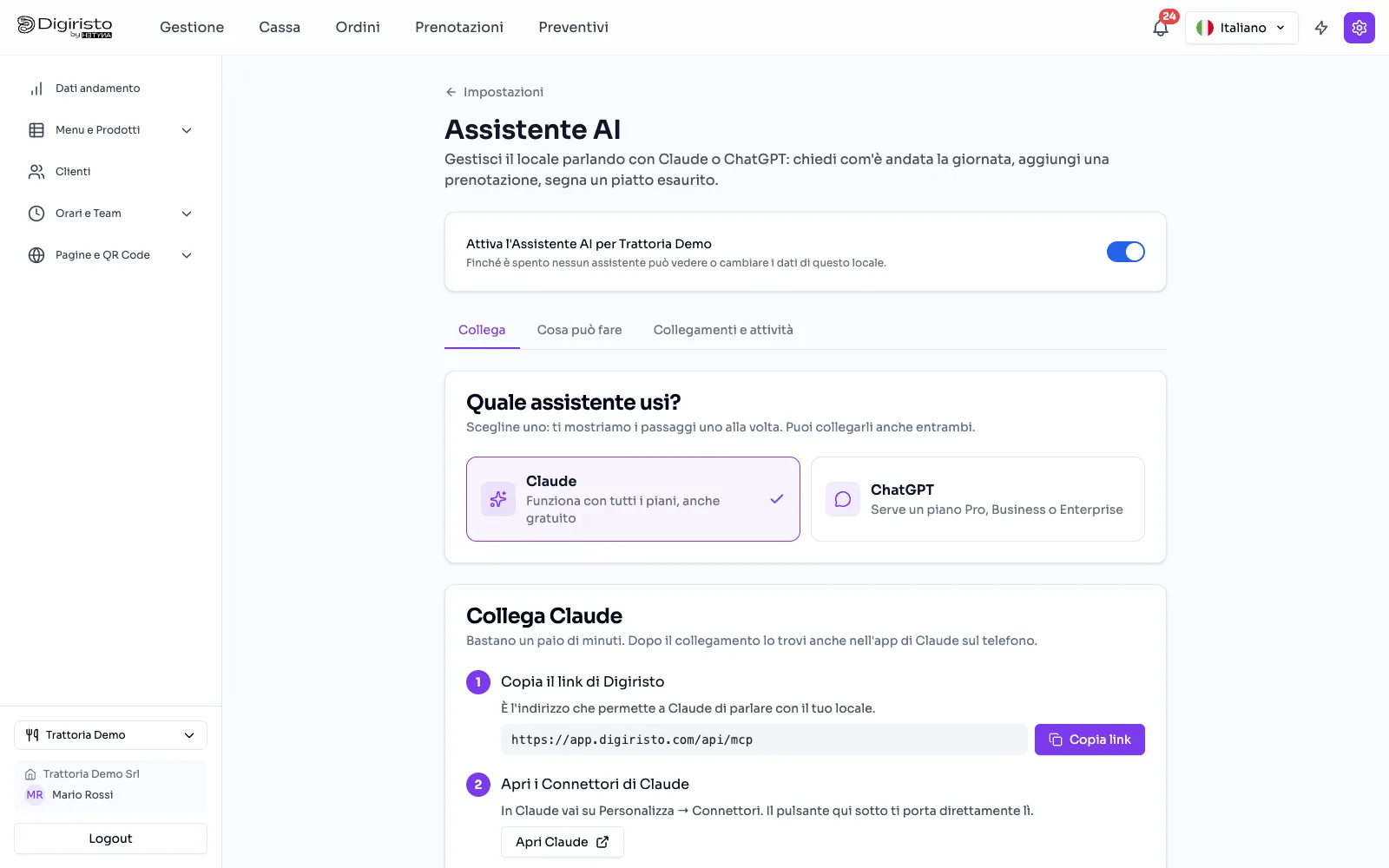
Two minutes, guided step by step
In Digiristo's Settings you pick Claude or ChatGPT and follow the numbered steps: copy a link, paste it into the assistant and press Authorize. No codes to generate and nothing to install.
- One switch to turn it on, restaurant by restaurant
- A single link to copy and paste
- You sign in with your Digiristo account: the assistant never sees your password
- With Claude it works on every plan, including the free one
Permissions
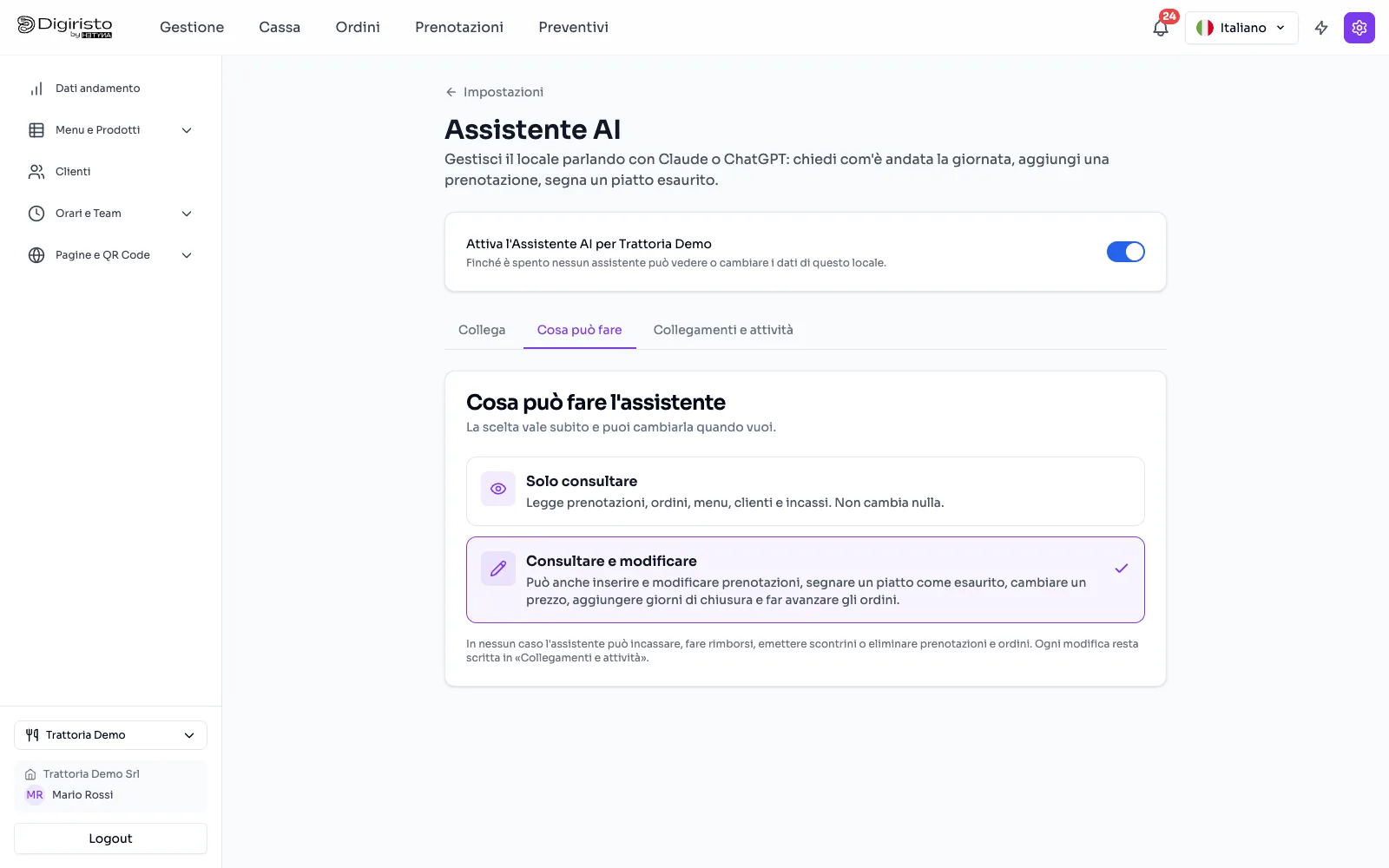
You decide how far it goes
At first the assistant can only read. When you trust it, you allow changes too, and you can go back whenever you like: the choice applies immediately. Some things always stay out of its reach.
- Read only: it reads and changes nothing
- Read and make changes: everyday actions
- Never payments, refunds or fiscal receipts
- Never deleting bookings and orders
Control
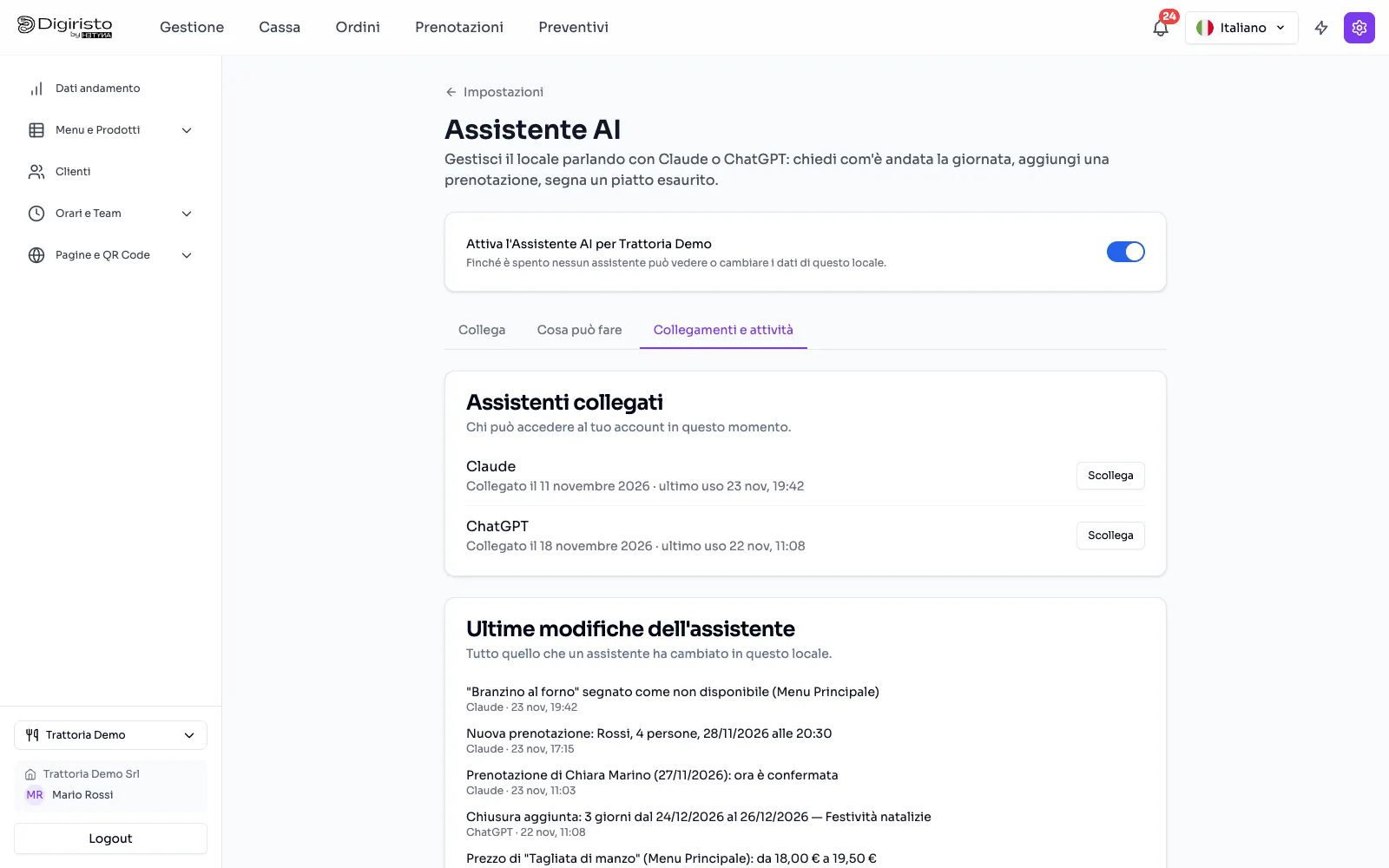
You always know what it did
In the Connections and activity tab you see which assistants are connected, when they were last used and the list of every change, written in plain words. One click disconnects any of them.
- List of connected assistants with last use
- Change log with date, time and assistant
- Disconnect in one click: access stops immediately
- Changing your password ends the connections
Connected before your next service
- 1
Turn the assistant on
In Settings → AI Assistant flip the switch for your restaurant.
- 2
Copy the link
Pick Claude or ChatGPT, copy the Digiristo link and paste it into the assistant following the steps.
- 3
Authorize and ask
Press Authorize and type your first question: “How is today going?”.
AI Assistant technical sheet
- Assistants
- Claude (every plan, including free) and ChatGPT (plans that support custom MCP servers: Pro read only, Business and Enterprise with changes too)
- Technology
- Remote MCP (Model Context Protocol) server, Streamable HTTP transport
- Access
- OAuth 2.1 with PKCE and automatic client registration; no password shared with the assistant
- Read
- Day overview, bookings, online orders, menu, opening hours and closures, customers, takings and best sellers
- Changes
- Bookings, dish availability and price, special closures, online order status; only with the “Read and make changes” permission
- Excluded
- Payments, refunds, fiscal receipts, deleting bookings and orders
- Control
- Per-restaurant switch, change log, immediate disconnection
- Cost
- No extra cost from Digiristo; the Claude or ChatGPT account is separate
AI Assistant frequently asked questions
Can I connect my restaurant management software to ChatGPT?
Yes. Digiristo exposes an MCP server that ChatGPT can add as a custom connection. Today ChatGPT allows this only on some paid plans: with Pro the assistant can only read data, with Business and Enterprise it can also make changes. The connection is created on the ChatGPT website, from a computer.
Does it work with Claude too?
Yes, on every plan, including the free one. In Claude you add Digiristo as a custom connector by pasting the link you find in Settings, then press Authorize. Once connected you can also use it from the Claude app on your phone.
What is an MCP server?
MCP (Model Context Protocol) is the standard AI assistants such as Claude and ChatGPT use to connect to external software. Digiristo's MCP server is the access point that lets the assistant read your restaurant's data and, if you allow it, make some changes.
Is it safe? Does the assistant know my password?
No, your password is never shared. The connection uses OAuth: you sign in to Digiristo as usual and press Authorize. The assistant receives a temporary key that you can revoke at any time with Disconnect. If you change your password, every connection ends.
Can the assistant delete data or take money?
No. It cannot take payments, issue refunds, print fiscal receipts or delete bookings and orders. By default it can only read; everyday changes, such as adding a booking or marking a dish as sold out, are possible only if you choose “Read and make changes”. Every change stays in the log.
Where does my restaurant's data go?
When you ask a question, Digiristo sends the assistant you connected the data needed to answer, for example the day's bookings. From then on the terms and privacy settings of Claude or ChatGPT apply. If you turn the switch off, the assistant receives nothing more.
I have several restaurants: can I use it with all of them?
Yes. The assistant is turned on restaurant by restaurant and you choose the permission level for each. If more than one is active, the assistant asks which one you mean.
How much does the AI Assistant cost?
Digiristo charges nothing extra: you turn it on from Settings. You need a Claude or ChatGPT account, which is separate. The data the assistant can read is the data of the features you use, such as bookings and online orders.
Ask your restaurant how today went
Start the free trial, turn on the AI Assistant from Settings and connect Claude or ChatGPT in two minutes. If you want to see it live, book a demo.
30-day free trial of the Premium plan · No card required