Kitchen · Bar · Pizzeria
Every ticket printed where the dish is made
Your waiter sends the order and Digiristo splits it for you: pasta to the kitchen, drinks to the bar, pizzas to the oven. Clear tickets, with notes and FOLLOW-UP easy to spot.
- Print points for kitchen, bar, pizzeria and other stations
- Epson ePOS and networked ESC/POS thermal printers, 58 or 80 mm paper
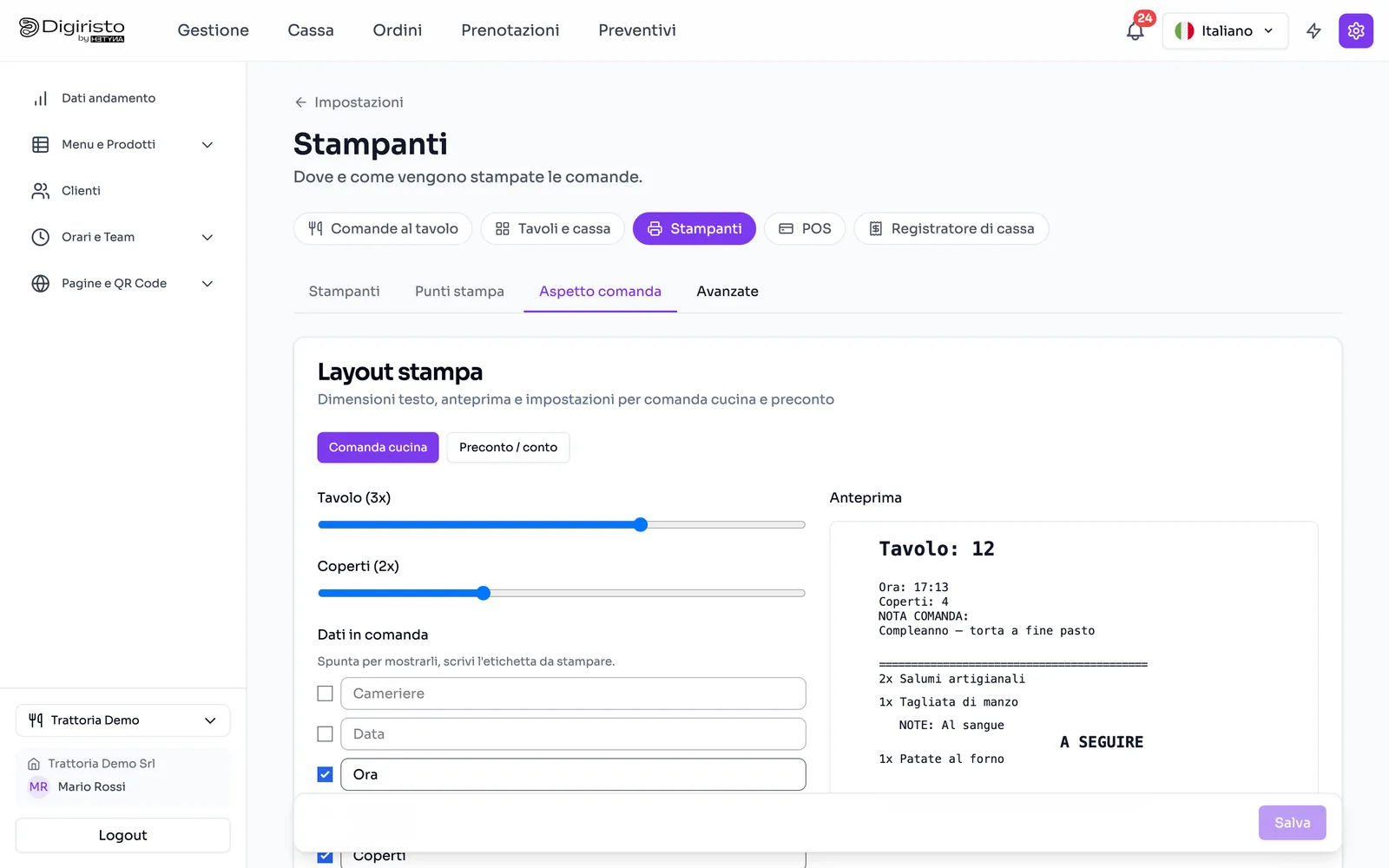
- Customisable ticket layout with live preview
30-day free trial of the Premium plan · No card required

How does Digiristo kitchen printing work?
Digiristo kitchen printing sends orders from restaurants, pizzerias, trattorias and bars to the thermal printers of each station. Every menu category is linked to a print point, for example Kitchen, Bar or Pizzeria, so each dish prints only where it is prepared. It works with Epson ePOS printers and networked ESC/POS printers on 58 or 80 mm paper, from both the till and the Digiristo Comande waiter app for Android, iOS, Windows and macOS. The ticket layout can be customised with a live preview, and the FOLLOW-UP marker separates courses. It is included in the Premium plan.
Each station its own
The kitchen sees only kitchen dishes, the bar only drinks.
Readable tickets
Large table number, notes under the dish, FOLLOW-UP stands out.
Standard printers
Epson ePOS or networked ESC/POS thermal printers: no proprietary hardware.
From till and phone
Tickets leave from both the till and the waiters' app.
The ticket
A ticket the kitchen reads at a glance
At the top of the ticket you find table, time and covers, then the dishes with quantities. Waiter notes print under the dish and the FOLLOW-UP marker clearly separates the course to hold.
- Dish notes printed under the line (NOTE: ...)
- FOLLOW-UP clearly visible between courses
- Voided items printed struck through
- Tickets sent in rounds, with reprint of the last one
Cucina
Tavolo: 3
Ora: 20:14
Coperti: 4
--------------------------------
2x Bruschette miste
2x Spaghetti alle vongole
NOTE: una senza aglio
1x Paccheri al ragù
A SEGUIRE
2x Tagliata di manzo
--------------------------------
Print points
Kitchen, bar, pizzeria: each gets its own
Create the print points of your venue, for example Kitchen, Bar and Pizzeria, and link menu categories and extras to each one. When the order goes out, every dish prints only at the station that prepares it.
- Every menu category and every extra linked to a print point
- Multiple copies per print point, if you need them
- Printer roles: kitchen, bar and receipt
- FOLLOW-UP always prints on the printer that gets the next items

Print layout
You decide how the ticket looks
In the print layout editor you choose what to print and how big, and see the result straight away in the preview. Kitchen tickets and pre-bills have separate layouts.
- Text size for table number and covers
- Fields to print: waiter, date, time, round, covers, order note
- Spacing and separator lines
- Three FOLLOW-UP styles: with lines, black band or plain
- Live preview while you edit
Printers
Works with the thermal printers you know
Epson ePOS printers receive tickets directly from the Digiristo Comande app on Android, iOS, Windows and macOS. Networked ESC/POS printers on port 9100 work from the desktop app or, from the browser, through Print Bridge, a small program on a PC or Raspberry Pi in the venue.
- 58 or 80 mm thermal paper
- Epson ePOS: direct printing from the Digiristo Comande app
- Networked ESC/POS (port 9100) via desktop app or Print Bridge
- Non-fiscal pre-bill on the receipt printer; fiscal receipts go through the Epson RT fiscal printer

Tickets printing in minutes
- 1
Add your printers
Enter the venue's printers and choose their role: kitchen, bar or receipt.
- 2
Create print points
Link menu categories and extras to Kitchen, Bar or Pizzeria.
- 3
Send the first ticket
From the till or the waiter app tap Send to kitchen and check the print.
Kitchen printing technical sheet
- Printers
- Epson ePOS thermal printers and networked ESC/POS printers (port 9100)
- Paper
- 58 mm or 80 mm
- Print from
- Till and Digiristo Comande app (Android, iOS, Windows, macOS); from the browser ESC/POS needs the desktop app or Print Bridge
- Stations
- Custom print points (Kitchen, Bar, Pizzeria...), multiple copies per print point
- Layout
- Editor with live preview; separate layouts for tickets and pre-bills
- Plan
- Included in Premium, with a 30-day free trial
Kitchen printing frequently asked questions
Which kitchen printers can I use?
You can use Epson ePOS thermal printers and ESC/POS printers connected to the network on port 9100, with 58 or 80 mm paper. If you have a different model, contact us and we will check together.
How do I print drinks at the bar and dishes in the kitchen?
Create print points, for example Kitchen and Bar, and link menu categories to each one. When you send the order, every dish prints only on its station's printer.
Do I need a computer to print tickets?
Not with Epson ePOS printers: the Digiristo Comande app prints directly over the venue's network. For generic ESC/POS printers from the browser you need the desktop app or Print Bridge, a small program on a PC or Raspberry Pi.
Can I change how the ticket looks?
Yes. In the print layout editor you choose the size of the table number and covers, the fields to print, spacing and the FOLLOW-UP style, with a live preview.
Does kitchen printing also issue the fiscal receipt?
No. Ticket printers print kitchen tickets and the non-fiscal pre-bill. The fiscal receipt is issued by the Epson RT fiscal printer connected to the Digiristo POS.
How much does Digiristo kitchen printing cost?
Kitchen printing is included in the Premium plan (€59.99 per month, or €49.99 per month billed yearly) together with the POS, waiter app, floor plan, bookings and online orders. You can try it free for 30 days.
Send your first ticket to the kitchen today
Start the free trial, connect your kitchen and bar printers and send a test ticket. Not sure yet? Book a demo and we will show you live.
30-day free trial of the Premium plan · No card required