Orders · Tables · Kitchen
Take the order at the table, the kitchen gets it instantly
Your waiter opens the table on the phone, adds dishes with notes and courses, and taps Send to kitchen. Each dish prints in the right station and the till already has the bill.
- Digiristo Comande app for Android, iPhone and iPad
- Personal PIN login, no passwords to remember
- Tickets printed in the kitchen, at the bar and in the pizzeria
30-day free trial of the Premium plan · No card required

What is the Digiristo waiter app?
Digiristo Comande is the waiter app for restaurants, pizzerias, trattorias and bars, used to take orders at the table from a smartphone or tablet. It runs on Android, iPhone and iPad, as a desktop app for Windows and macOS, and in the browser, with the same account as the back office. Waiters log in with a PIN, open the table bill with the number of covers, add dishes with notes and courses (starter, first course, main) and send the order: each dish prints on the printer of its station, such as kitchen, bar or pizzeria. Tables, bills and the till update in real time. The app is included in the Premium plan.
No more paper pads
Orders leave from the phone: no handwriting to decode in the kitchen.
Fewer trips
Waiters stay on the floor, the station printer does the rest.
Till ready to go
The bill fills up as you order: nothing is typed twice at the till.
Easy to learn
Tables, categories, dishes, Send. Even on a new waiter's first day.
Tables
Your whole dining room in your hand
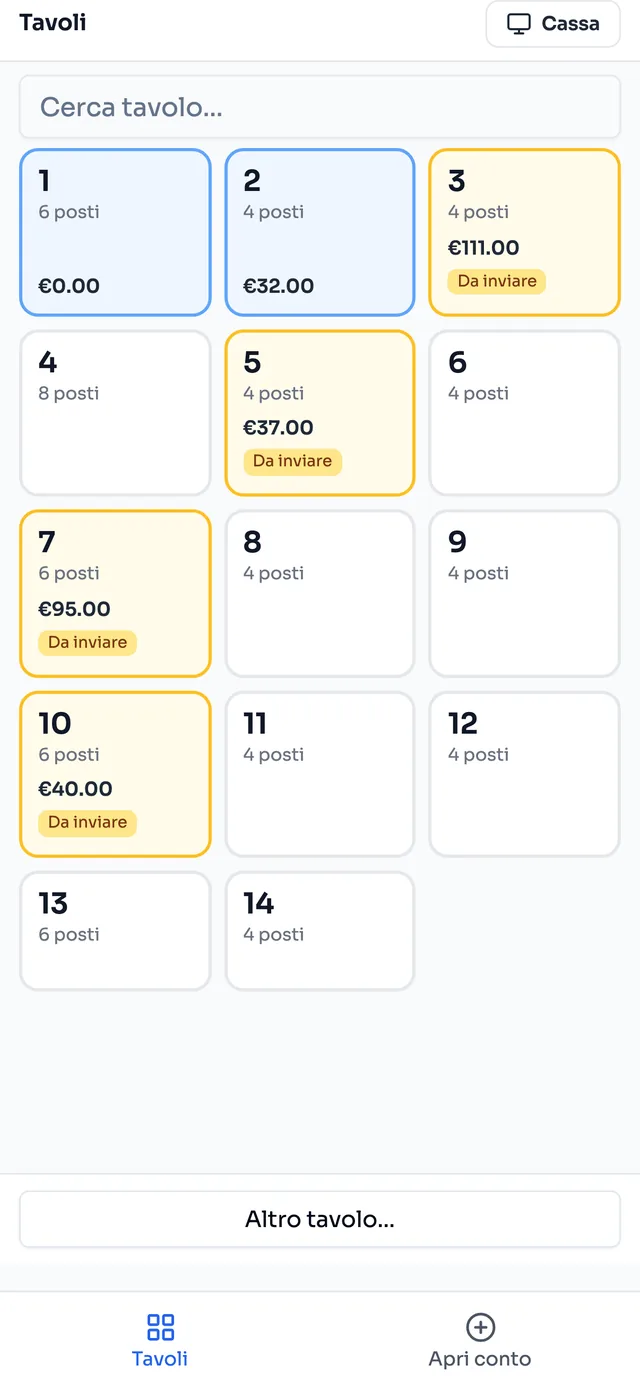
The first screen shows the table grid with seats and, for open tables, the live bill total. Find a table, tap it and open the bill with the number of covers.
- Seats per table and an always up-to-date bill total
- Quick table search
- Other table… for tables not on the list
- Open bill with covers, even zero for bar service
At the table
Your handheld is the phone you already own
No need to buy dedicated handhelds: the app runs on Android phones and tablets, iPhone and iPad. To add a new device just scan a QR code from the back office, then each waiter logs in with their own PIN.
- Android, iPhone and iPad, plus desktop app for Windows and macOS
- Also works in the browser, with the same back office account
- New devices paired with a QR code, no passwords to type
- Personal 4 to 6 digit PIN for each waiter

The order
Dishes, notes and courses in a few taps
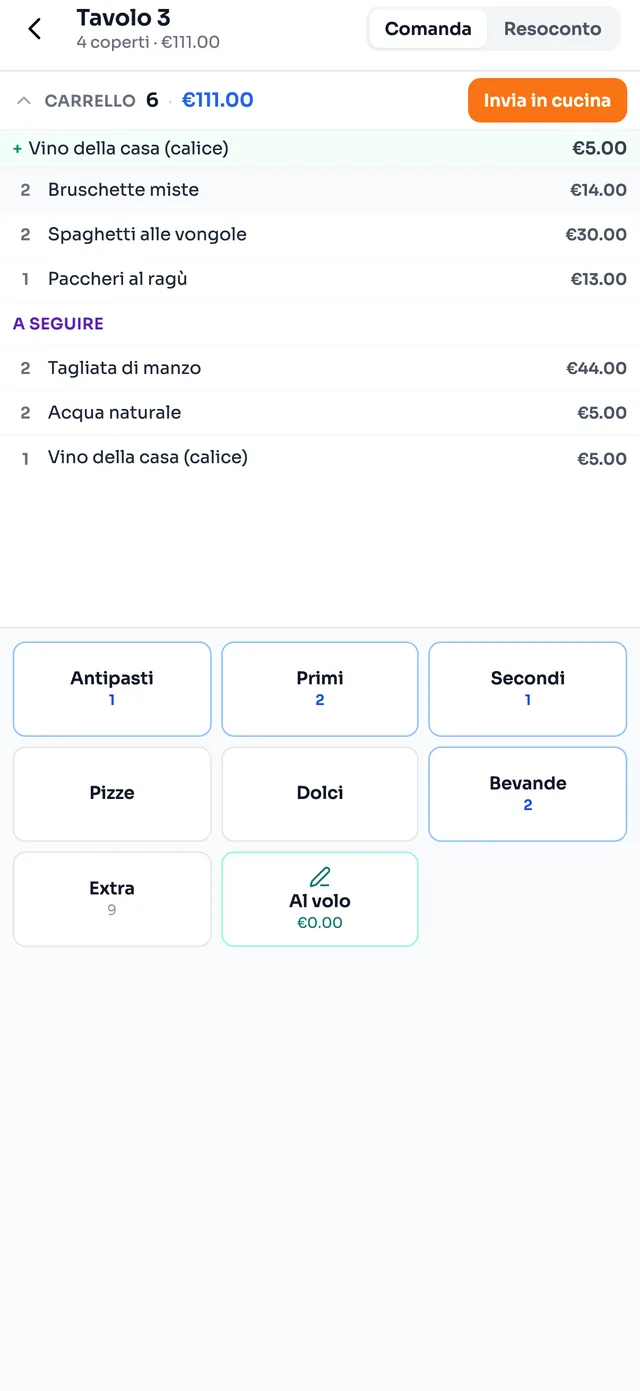
Pick a category, tap the dishes and set quantities. Add a note to a dish, set its course and insert FOLLOW-UP so the main is only prepared when you call it. Then tap Send to kitchen.
- Your menu categories, quantities and notes for every dish
- Course for each dish: starter, first course, main and so on
- FOLLOW-UP marker to hold the next course
- Quick items: off-menu dishes with free name and price
- Quick extras for cover charge, service and add-ons
- Summary tab with everything already sent for the table

In the kitchen
Every dish reaches the right station
With Send to kitchen the order goes out in rounds and each dish prints where it is prepared, based on its menu category: pasta in the kitchen, drinks at the bar, pizzas in the pizzeria. With Epson ePOS printers the app prints directly over the venue's local network.
- Tickets split by station: kitchen, bar, pizzeria
- Reprint the last ticket sent to the kitchen
- Void items already sent
- Bill and floor plan updated in real time at the till too
Cucina
Tavolo: 3
Ora: 20:14
Coperti: 4
--------------------------------
2x Bruschette miste
2x Spaghetti alle vongole
NOTE: una senza aglio
1x Paccheri al ragù
A SEGUIRE
2x Tagliata di manzo
--------------------------------
Ready for tonight's service
- 1
Download the app
Install Digiristo Comande on your waiters' phones or tablets, Android or iOS.
- 2
Pair with a QR code
Scan the QR code from the back office and give each waiter a PIN.
- 3
Take the first order
Open the table, add the dishes and tap Send to kitchen.
Waiter app technical sheet
- Devices
- Android and iOS app (iPhone and iPad); desktop app for Windows and macOS; browser
- Login
- 4 to 6 digit PIN per waiter; new devices paired with a QR code from the back office
- Ordering
- Categories, quantities, notes per dish, courses, FOLLOW-UP, quick off-menu items, cover charge and service
- Sending
- Rounds sent to station printers (kitchen, bar, pizzeria) based on menu category
- Printers
- Direct printing from the app to Epson ePOS printers on the local network
- Plan
- Included in Premium, with a 30-day free trial
Waiter app frequently asked questions
Does the waiter app work on iPhone and Android?
Yes. Digiristo Comande is available for Android and iOS, so on iPhone and iPad. It also comes as a desktop app for Windows and macOS and can be used in the browser.
Do I need to buy dedicated handhelds?
No. You can use the smartphones or tablets you already have, Android or Apple. Each new device is paired by scanning a QR code from the back office.
How do waiters log in?
Each waiter logs in with a personal 4 to 6 digit PIN. There are no passwords to type on the phone during service.
How does the order reach the kitchen and the bar?
When you tap Send to kitchen, each dish prints on the printer of its station based on its menu category, for example kitchen, bar or pizzeria. If needed, you can reprint the last ticket.
Can I hold the main course until I call it?
Yes. Insert the FOLLOW-UP marker between courses: the kitchen sees at once what to prepare now and what to hold.
How much does the Digiristo waiter app cost?
The waiter app is included in the Premium plan (€59.99 per month, or €49.99 per month billed yearly) together with the POS, kitchen printing, floor plan, bookings and online orders. You can try it free for 30 days.
Try the waiter app on your next service
Start the free trial, pair your waiters' phones with a QR code and send the first order to the kitchen. Not sure yet? Book a demo and we will show you live.
30-day free trial of the Premium plan · No card required